Guide
Minecraft Concrete and Wool Stairs: Roof Palette Ideas
Keep the roof shape consistent while you experiment with color and texture.
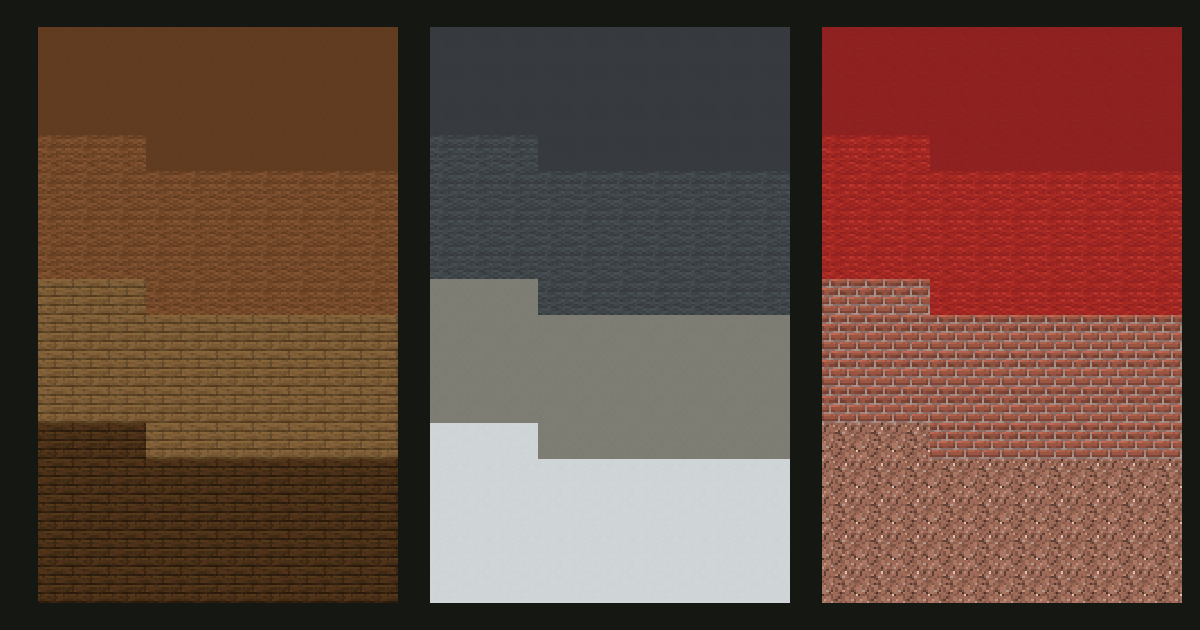
26.3 preview guide. Version information checked September 8, 2026. The new stair and slab sets are preview features; this article uses Java 26.3-pre-2 textures. Check your edition and version before gathering materials.
Why these shapes matter for roof palettes
A roof made from stairs has a different silhouette from a roof made from full blocks. When compatible shapes are available in more materials, you can change the surface while keeping its outline consistent. That makes it easier to plan a colored roof without turning every material change into a step in the geometry.
Mojang's feature overview describes concrete and wool stairs and slabs in all sixteen colors. The release-stage reference for this guide is Java 26.3 Pre-Release 2.  Bedrock preview availability and behavior should be checked separately.
The illustrations here are material studies using the parent textures. They do not show the full stair models or prove an in-game roof layout.
1. Brown roof with spruce trim

- Main roof:
 brown concrete stairs for broad, relatively quiet sections.
 - Texture patches:
 brown wool stairs where you want a softer-looking pattern.
 - Eaves:
 spruce stairs along the roof edge.
 - Frame: dark oak for posts or the gable outline.
Start with one concrete roof plane, then add a small connected wool patch. Compare the brown materials beside the actual spruce edge. They are companions with different patterns, not a promise of a perfectly smooth color ramp.
Open the brown material palette.
Older-version option: use spruce stairs for the roof and dark oak for the frame. Try the brown wool or concrete as full-block gable panels instead of substituting full blocks into a stair slope.
2. Gray roof with a pale facade

Use  gray concrete stairs as the main roof,
  gray wool stairs in limited patches, and
  light gray concrete for a separate ridge or edge detail. A
  white concrete wall gives the roof a clear boundary.
Keep the lightest roof material concentrated. Scattering it everywhere can compete with windows and trim. If the transition feels too abrupt, retain a two-material roof and use light gray elsewhere on the building.
Open the gray material palette.
Older-version option: try  deepslate tile stairs above a white concrete facade. It changes the surface pattern but preserves the dark-roof, pale-wall relationship.
3. Red roof with brickwork

Combine  red concrete stairs with small
  red wool patches. Use
  bricks for the chimney or gable edge and
  granite for a separate foundation detail. The brick pattern introduces structure, so placing it along an architectural boundary can be clearer than mixing it through every roof row.
Open the red material palette.
Older-version option: make the roof from  brick stairs and save red wool for a banner-like panel, awning, or other full-block feature.
Build one repeatable roof section
- Make a small roof section in one stair material first.
- Check its slope, corner joins, overhang, and underside before adding texture.
- Replace a short run with a second material using the same orientation.
- Inspect the roof from below and from the side. A color change should not disguise an unwanted shape change.
- Add a ridge or trim only after the main plane works.
Use color to support the roof's shape: a darker eave, a lighter ridge, or a localized repaired patch are possible directions. You do not need all three on one roof.
Choose materials for the world you play in
These are aesthetic starting points. Do not assume that a new colored stair inherits the fire, tool, or crafting behavior of a  stone stair just because its shape matches. Check the relevant version's recipes and behavior before placing it beside fire or committing a large survival build.
If you are planning a full house, use the palette generator to collect companion colors. For the placement principles behind the surface, read the Minecraft gradient tutorial. A wall and a roof can share a color family while using different textures and different amounts of detail.